

The Problem
Despite becoming a hotspot for slow travelers and expats, many of Japan’s 1,700+ wards don’t offer common residency, health and tax forms in English and English speaking staff aren’t always available. This is especially true in wards that see less tourism. Many of these forms are available online as PDFs thankfully, but sometimes they only contain image data. A user hastily filling out a form with their phone will face lighting and camera focus conditions that mess with character recognition. Written Japanese is also dense so English definitions take up more space on a virtual page. OCR with overlaid translations is difficult to parse visually, but numbered labels can fit in on these forms without obscuring text.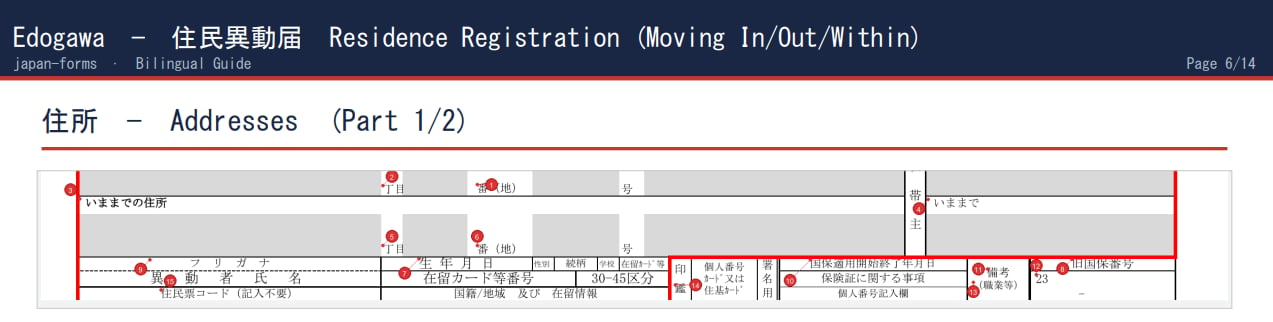
Why an LLM
As strong a travel tool as Google Translate is, it doesn’t have context for your translation. Kanji characters are highly context sensitive. Municipal forms have their own vocabulary. I chose to use an LLM for translation so I could provide context on the specific types of documents that were input. As more documents were translated, more edge cases were discovered, and the dictionary became more complete.High-Level Overview
Japan Forms is a collection of Python scripts that scrape government websites for Japanese language forms, translates them, and outputs walkthroughs for how to complete them. It uses EasyOCR to create character information for image-based PDFs, pdfplumber to pull character information from PDFs that have it. Claude translates the character data into English. pdf2image generates images from the original PDFs, and somewhat ironically, reportlab embeds those into a multi-page PDF with annotations, helpful phrases and a cover page.Script by Script - How it Works
run.py is a simple CLI frontend that allows you to select a ward and document to start translation. In early renditions of Japan Forms, as I was sorting out how translations were stored and guides were generated, I used a simple Claude Code instance in terminal to do this.
scraper.py uses BeautifulSoup to crawl through municipal government websites for residency move-in/move-out forms, tax forms and health forms ward by ward. There isn’t a centralized repository for these documents, and many of the websites they occupy are unintuitive to navigate. When the scraper finds them, it downloads them into a local cache with a label for the ward and form type.
pipeline.py manages OCR, clustering, translations, caching, translation failures and guide generation. It’s the biggest script of the bunch. It opens each PDF with pdfplumber to get the x/y position of every character on the page. If character data is not present, it is constructed with EasyOCR. Characters are grouped by proximity. If characters are within 3 points vertically they are counted as being a part of the same line. If characters have a gap greater than 15 points, they’re considered separate fields. Text is also checked for being vertical or horizontally oriented. There is a fragment matcher as well that checks for Kanji that are spaced widely yet seem to form a single idea. The clustered fields are then translated.
translation_cache.json first then dictionary.json. If the field isn’t a match for either, it will see if the dictionary can construct a definition out of partial dictionary matches. If neither produces a translation, pipeline.py will request a Claude Sonnet translation that is added to the translation_cache. If translation_cache receives multiple entries of the same term, that gets migrated to the dictionary and flushed from the cache.
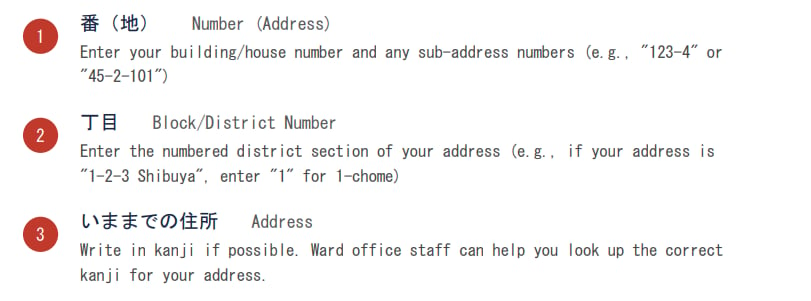
With all this information, pipeline.py then generates a guide. Page 1 of each guide contains the original Japanese form. Page 2 provides some information about the form that’s being translated. Pages 3 onward contain cropped sections of form with translations. Claude Vision checks for pixel darkness to make sure the reference number isn’t placed over instructional text in the guide. The last page has some phrases that may be helpful for submitting the form in person in Japanese.
The last script is check.py. It checks for missing translations and provides coverage percentages by ward. It can also request new translations for untranslated fields from a function within the pipeline.py script. It also serves as a scoring system. It produces data for progress tables. There are a lot of wards out there with untranslated documents. While the current solution does a reasonable job with Tokyo wards, there are surely some errors.
Architecting Responsibility w/ LLMs
Japan Forms is my first project that explicitly uses LLMs. They’re powerful and imprecise. It was important to be cost conscious and careful with these translations. That said, the current translation tiering system withinpipeline.py and find_gaps.py errs more towards cost consciousness and consistency than verifiable quality.
Cache
Every source string is logged with its first translation. Each following occurrence returns free, regardless of whether the translation came from the Dictionary, a Fragment Match or the LLM (Claude Sonnet). It ensures consistency, not necessarily confidence.Dictionary
High-confidence map of known field names. Free, deterministic, trusted.Fragment Matching
When strings aren’t in the dictionary as a whole,pipeline.py tries to compose a translation from known sub strings. Often occurs with kanji strings. Free, deterministic, and lower confidence.
LLM (Claude Sonnet)
Invoked when all others miss. Cached on return so the same string never needs an LLM translation twice.find_gaps.py lists the top common untranslated fields across all walkthroughs, and I manually review potential translations. Approved entries are written into the dictionary. The system coheres around the most common terms by elevating them first, where my review effort goes furthest.
However, I’m incapable of checking some of the work I’m asking the LLM to do. I do not read Japanese, especially kanji, fluently. This isn’t the system’s fault, but more capable hands would be able to make better use of the system as it is. If I were to redesign it, I might trigger LLM translations more often, and promote the most common ones to the dictionary.