1. Goal

The first layer of customer support for most applications is now an AI assistant. That AI assistant typically needs a few messages of conversation before it has enough context to be useful. In most shopping or banking UX, a help button is available right from an order or disclosure page. Through prompt caching, you can pre-warm the assistant with information the user is already looking at, skipping unnecessary back and forth. This tutorial walks through an implementation of this flow and points out when prompt caching is worth it. Anthropic’s broader cookbook on prompt caching is a better way to get familiar with the technique’s other applications. The cookbook’s examples cache more conservatively than this tutorial’s eager-on-click approach: Anthropic’s Prompt Caching Cookbook

2. TLDR

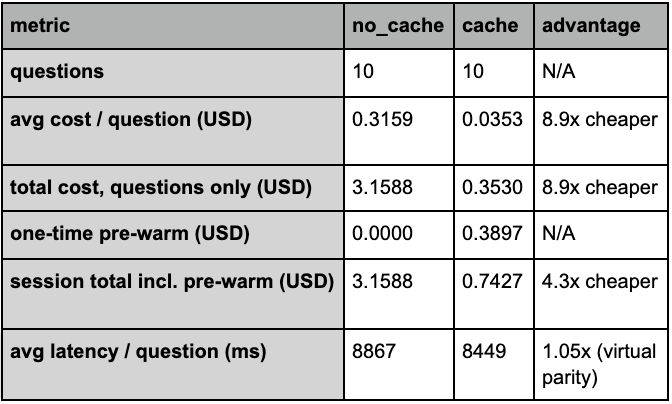
After a user asks your bot 2 questions about the same document, prompt caching becomes cheaper than no-caching. By question 10, caching is 4x cheaper. Consider using prompt caching if users are asking more than one question about a document. This eager-on-intent flow prompt caches the document as soon as a user clicks on the help button, but it doesn’t meaningfully reduce latency in this demo. Frankenstein has around 100K tokens. Anthropic’s cookbook run with Pride and Prejudice at roughly 190K tokens saw a 3.3x speedup. The latency benefit prompt caching can offer comes from a reduction in prefix reprocessing. Frankenstein doesn’t reach this threshold. Pride and Prejudice does. This comparison cost 3.56 USD. 2.84 USD for no-cache and 0.71 USD for cache.

3. Prerequisites

This tutorial uses Anthropic’s javascript SDK, Python3, NODE and HTML. Anthropic JS SDK You will also need an API key. You can generate one by clicking “Generate API Key” on your home dashboard after logging in Anthropic Dev Dash. In your editor of choice (I use VS Code), I recommend creating a .env file and pasting this API key in it. Anthropic will not provide your API key again once it’s generated. If you decide to use version control like git & github, make sure to save it into a folder that isn’t updated like .gitignore. Otherwise, you’ll be broadcasting free tokens to the world wide web. Last, we’re using Mary Shelley’s Frankenstein as our reference document. Gutenberg Project Frankenstein

4. Important Definitions

Prefix: A prefix is a contiguous string of information. It begins at the start of a request and ends at a predetermined cut off called a cache breakpoint. Prefixes are stored in the cache and matched by exact token sequence. Cache Breakpoint: The point where a prefix ends. It is determined by the cache_control field. The breakpoint and everything prior is included in the prefix. Block: A block is the smallest addressable unit in the API. Each block has a type, text, image, document, tool_use, tool_result and corresponding data. The message’s content field is an array of blocks. A single message can contain many. The cache_control field attaches to a block, not a message or request. Blocks can have very different token sizes. A single text block could have 5 or 50k tokens. Use the usage field in API responses to see token counts. Cache Hit: A match between prefixes. The cached prefix and the prefix of a new request match so the input can be reused at roughly 10% the standard input token rate. A new response is still generated. Cache Miss: A new request’s prefix doesn’t match a cached entry. The API processes the prompt and writes it to a prefix in the cache for next time if cache_control is set. This cache write costs roughly 25% more than standard input tokens. If cache_control isn’t set, the request is processed at the standard input token rate, but no cache is set.

5. The Pattern

In this tutorial, we’ll be implementing prompt caching on an AI assistant that is triggered by a user’s click of a help button. We eliminate a common UX back and forth where the assistant asks “what can I help with?”, by populating Claude’s context before the user’s first question. This is an eager-on-intent approach. You can pre-warm at any stage however. These will have different cost implications. You could pre-warm as soon as the page loads (eager-on-load, always incur 1.25x cache cost) or wait for the user to ask your chat assistant a relevant question (lazy-load, only incur cache cost when user confirms it’s relevant). How you decide to pre-warm should be highly dependent on how people use your site. Eager-on load will fire every page view, even bounces. Lazy will take more time to get to your user’s first question. This tutorial uses eager-in-intent because we assume a user who clicks on a help button is a high-confidence intent signal.

6. Tutorial Snippets

6.1 Two HTML Buttons

  <button id="openChatPlain" title="Chat with the novel sent UNcached — full 
  price every question">
    Help
  </button>
  <button id="openChatCache" title="Pre-warm the cache now, then chat with the 
  novel read from cache">
    Help with cache
  </button>
Two entry points, one differentiator: which button is clicked decides whether the novel is cached. The buttons are wired up like this at index.html:
document.getElementById("openChatPlain").onclick = () => openChat(false);
document.getElementById("openChatCache").onclick = () => openChat(true);

6.2 Cache Warm Up

Server — “Warm up” is a throwaway call whose only job is to write the prefix into cache:
  app.post("/api/prewarm", async (req, res) => {
    const response = await client.messages.create({
      model: MODEL,
      max_tokens: 8,
      system: buildSystemPrompt(true),
      messages: [{ role: "user", content: "Reply with just: OK" }],
    });
    // ...returns latency + usage; cache_creation_input_tokens ≈ 103,894 here
  });
  Clientfired the instant "Help with cache" is clicked, before any question (Cache write costs $0.39):
  if (cacheMode) {
    const m = addMessage("System", "claude", "Pre-warming the cache (writing the
   novel in now)…");
    const res = await fetch("/api/prewarm", { method: "POST" });
    // "Cache pre-warmed. Every question is a cheap, fast cache hit."
  }
The warm-up call caches the system prompt your real questions will use, paired with a throwaway user message. The user message isn’t part of the cached prefix, so it can be anything. “OK” keeps the response tiny and cheap.

6.3 The Ask Function

server server.js:63,162 + client index.html:423
  The caching mechanism is this one conditional (buildSystemPrompt):
  function buildSystemPrompt(useCache) {
    const novelBlock = { type: "text", text: FRANKENSTEIN_TEXT };
    if (useCache) {
      novelBlock.cache_control = { type: "ephemeral" };   // <-- the only 
  difference
    }
    return [
      { type: "text", text: "You are a literary assistant. Answer ... concise."
  },
      novelBlock,
    ];
  }
  app.post("/api/ask", async (req, res) => {
    const question = (req.body?.question ?? "").trim();
    const useCache = req.body?.cache === true;
    const response = await client.messages.create({
      model: MODEL,
      max_tokens: 1024,
      system: buildSystemPrompt(useCache),               // stable prefix 
  (cached or not)
      messages: [{ role: "user", content: question }],   // volatile suffix — 
  never cached
    });
    // ...extract answer, compute cost, append to log
  });
  Client ask() — sends the question with the mode chosen at open time:
  async function ask() {
    const question = input.value.trim();
    if (!question) return;
    const res = await fetch("/api/ask", {
      method: "POST",
      headers: { "Content-Type": "application/json" },
      body: JSON.stringify({ question, cache: session.cacheMode }),
    });
    const data = await res.json();
    pending.querySelector(".body").textContent = data.answer;
    addMetrics(pending, data);                            // time + cost line
  }
The novel is stable across questions so it’s cacheable. The user’s question goes in messages. It isn’t ever cached because it changes every turn. Caching the whole thing comes down to a single if statement.

6.4 The Simulation Questions

The 10 simulation questions — simulate.py (new, runnable)
  QUESTIONS = [
      "Who is Robert Walton and why is he writing letters?",
      "How does Victor Frankenstein bring the creature to life?",
      "What happens to William Frankenstein?",
      "Why is Justine Moritz executed?",
      "How does the creature learn to speak and read?",
      "What does the creature demand that Victor make for him?",
      "Who are the De Lacey family and how does the creature observe them?",
      "What happens to Elizabeth on her wedding night?",
      "How and where does Victor Frankenstein die?",
      "What does the creature do at the very end of the novel?",
  ]

7. Cost analysis

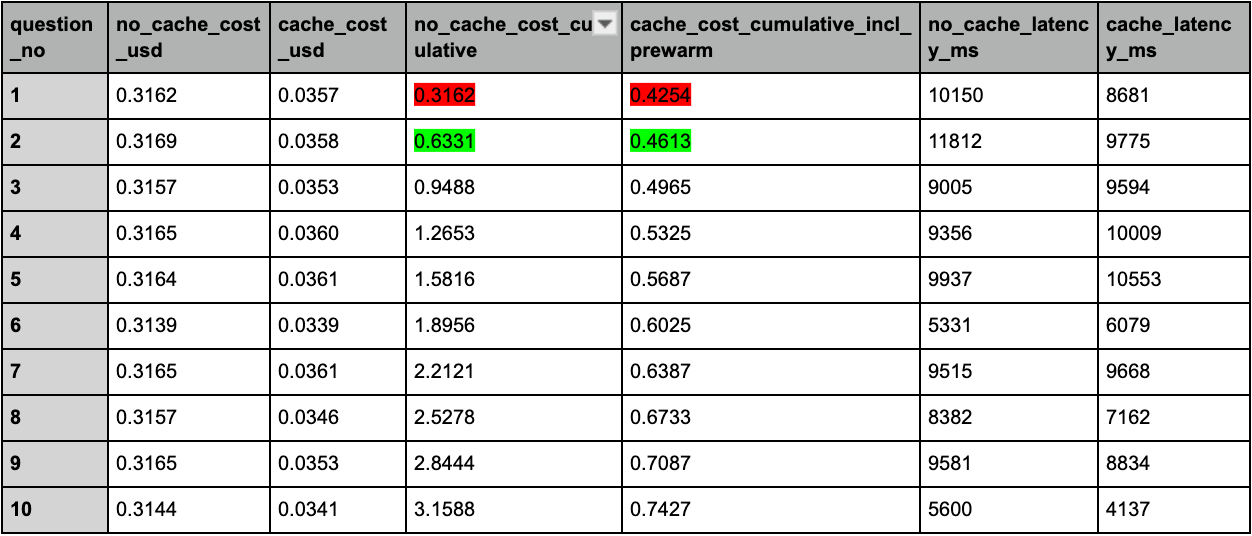
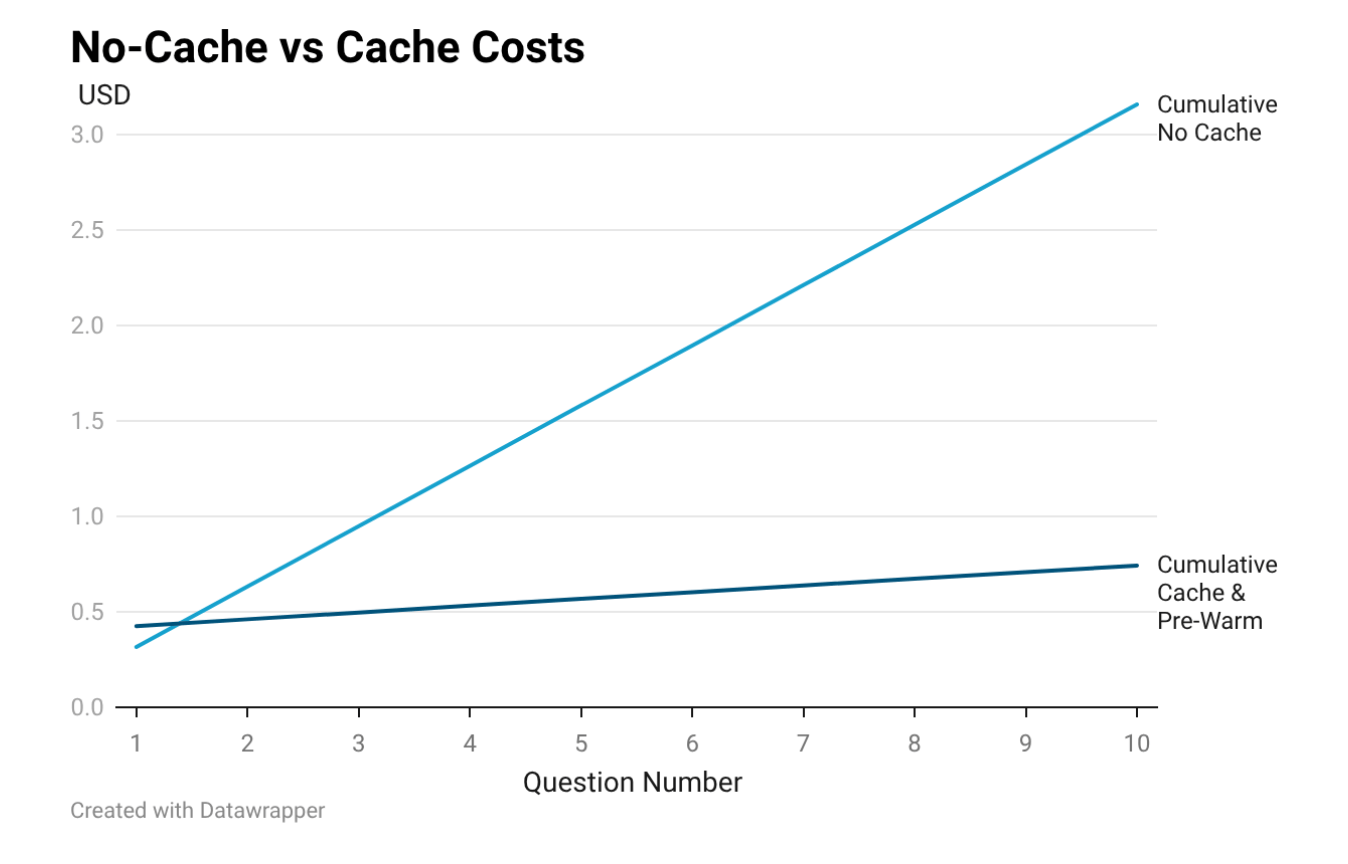
A prompt cache costs 1.25x more than a single question, so this pre-warm call costs more than the first question without a cache. By question 2 of this demo, the per-question savings have overcome that upfront cost. By question 10, the cached path is 4.3x cheaper overall. Cumulative cost: no-cache vs cache across 10 questions The cached line starts higher than the no-cache line because the pre-warm call costs $0.39 upfront, paid before any user question. By question 2, the per-question savings have overcome that upfront cost. Summarized Comparison Table: no-cache vs cache across 10 questions Summary Table Download (CSV) Cumulative cost & latency table: no-cache vs cache across 10 questions Cost Table Download (CSV)
8. Where pre-warming with prompt caching makes sense

Pre-warming with prompt caching pays off when users ask multiple questions per session. For a document in Frankenstein’s range, costs improve at 2 questions. There are some additional restrictions on prompt caching to be aware of. By default, prompt-caching times out after 5 minutes. 1 hour is available but it doubles the write costs. Your document must also meet caching minimums. Sonnet has a 1024 token minimum. Opus and Haiku have a 4096 caching minimum. If you take the average token size of an English word, 0.75x, that means documents with less than 1,366 words aren’t eligible for prompt caching. If your user base only asks one question or it misclicks the help buttons regularly, cache prompting probably isn’t worth it. If you’re seeking a latency improvement, this technique won’t provide one unless you are working with documents larger than Frankenstein’s roughly 100k tokens. Anthropic managed to find an improvement with Pride and Prejudices’ ~190k tokens, but I don’t yet know where the crossover is. I’m only willing to spend so much in the name of science.